Mobile Phone Cameras in Teaching and Learning

My latest “Teaching with Tech” column for MAA Focus just published this week.

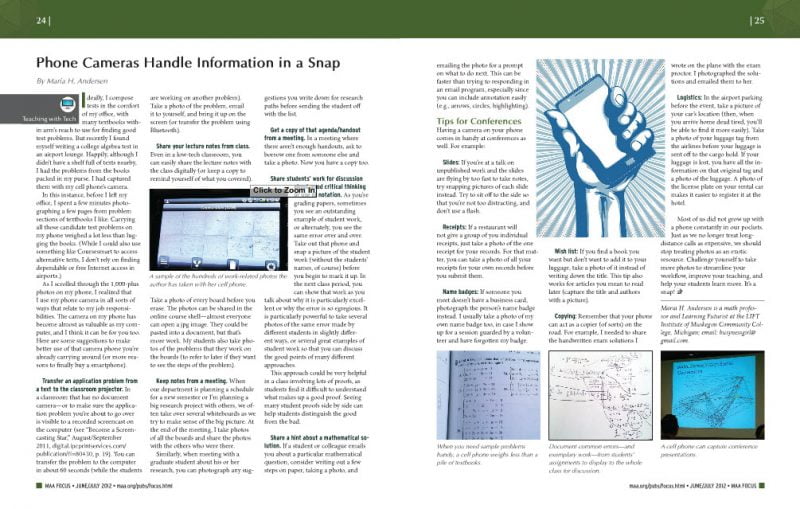
Phone Cameras Handle Information in a Snap!

Teaching with Tech: Phone Cameras Handle Information in a Snap!


Here are the general topic areas:

  • Carrying a library of “good problems” with you for topics you are teaching.
  • Transfer an application problem to the computer/projector in your classroom.
  • Share your lecture notes from class (from a blackboard, whiteboard, or document camera).
  • Keep notes from a meeting.
  • Make a copy of a handout or meeting agenda.
  • Share student work for discussion about good methods or errors in thinking.
  • Answer emailed questions easily.
  • Tips for Conferences

Phone Cameras Handle Information in a Snap!

Archive of Teaching with Tech Columns


Possibly Related Posts:


Share

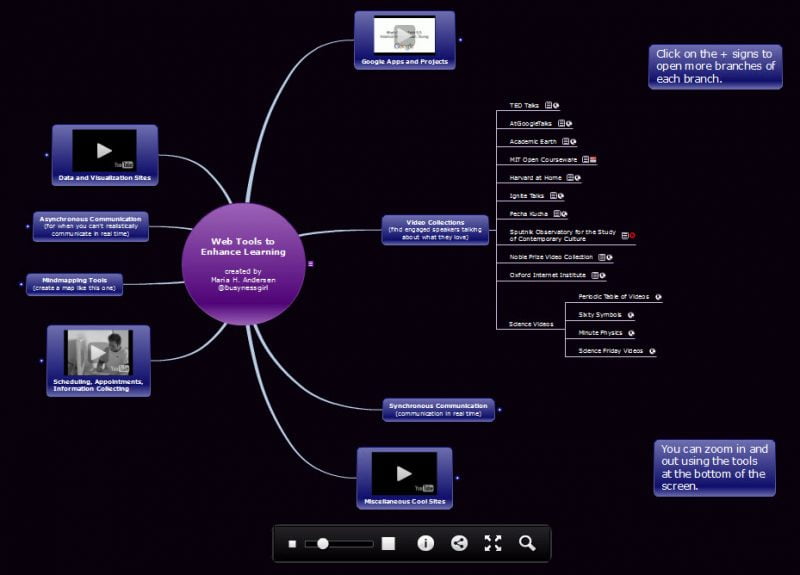
Web Tools to Enhance Learning

Here’s a new mindmap containing my recently organized collection of great sites and tools for learning and teaching.  The collections are:

  • Google Sites and Apps
  • Video Collections
  • Synchronous Communication Tools
  • Asynchronous Communication Tools
  • Mindmapping Tools
  • Data Visualization
  • Scheduling, Appointments, and Information Collecting

Mindmap: Web Tools to Enhance Learning

To see more digital mindmaps, go to Resources: Mindmaps.

Possibly Related Posts:


Share

Report from the 1st TaLDA Workshop

During the 2nd week of May, a group of faculty and instructional designers gathered for the first ever TaLDA Workshop at Muskegon Community College. TaLDA = Teaching and Learning in the Digital Age. This was a workshop inspired from the success of the annual Math & Technology Workshop, but designed for faculty and staff from any discipline. This year, instructional designers and distance ed coordinators joined faculty who teach Theater, Humanities, Psychology, Education, Library Sciences, Information Literacy, and Computer Information Systems joined to create a truly unique and fun week of technology experiences.

This was a tech conference unlike most any other. There was laughing, dancing, and even some crying. [Note: The crying was tears of joy.]

The TaLDA workshop is designed to layer on technology skills as the week progresses.  Participants must attend for the whole week – there’s no picking and choosing.  From years of experience, I can tell you that we all have gaps in our knowledge base, and the more of these gaps that get filled, the better our technology experiences will be.

View our FlickR Photostream from TaLDA 2012

Some of the topics at TaLDA included:

  • HTML Basics (so you can do a little bit of hacking when a website or course page doesn’t behave)
  • Jing (for sharing images or video on both the student and instructor side)
  • Search tips, browser tips and online bookmarking (aka “The Secret Technology Club”)
  • Web Tools for Enhancing Online Courses (see mindmap by following link)
  • Data visualizations
  • Building your own web presence (primarily LinkedIn and Google Sites)
  • Using digital mindmaps to organize and retrieve information
  • Online learning design
  • Social media for learning and for educational use (primarily Twitter and Facebook)
  • Presentation design
  • Copyright and Copyleft
  • Using SnagIt to create any image you can imagine
  • Synchronous Communications (SAVI = synchronous audio visual interactions)
  • Using Camtasia Studio to edit and produce videos
  • Mobile and Tablet Apps for learning and professional use
  • Using games to teach/learn concepts
  • Finding and using Classroom Response Questions
  • Wolfram Alpha Workshop (trust me, it’s not just for math folks)
  • Google Docs, Forms, etc.
  • Organize Your Digital Self

The big surprise (for everyone, including me) was the great joy we found in using Instructure Canvas (an LMS that is about 15 months old now).  The operative word of TaLDA turned out to be “gobsmacked” as in “we were all gobsmacked when we discovered that there is an LMS that is intuitive and easy to use from both the student and teacher side.”

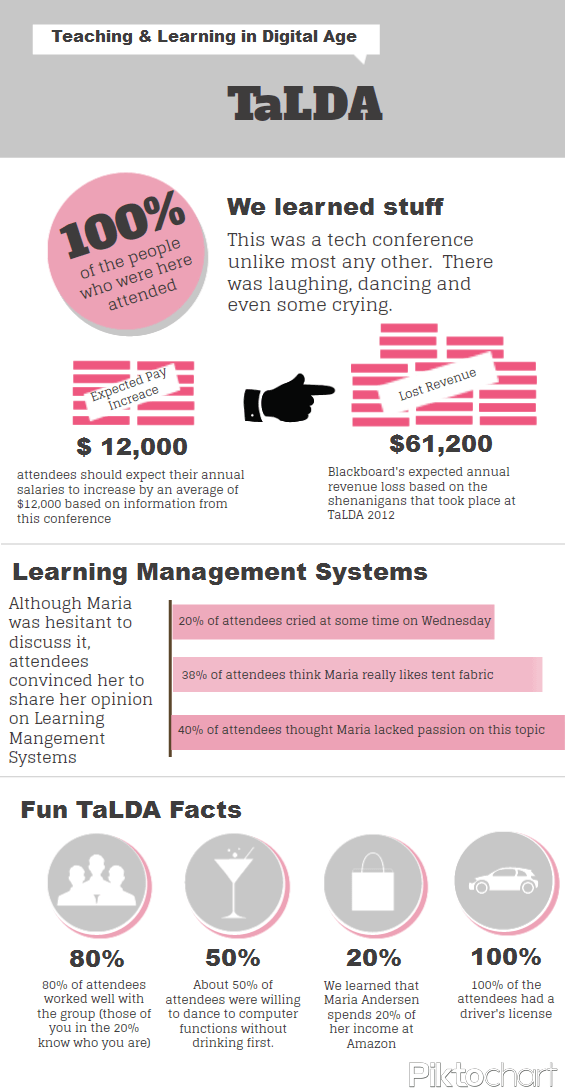
Click on the image of the infographic to enlarge.

One of the participants (Christopher) created a great “infographic” to demonstrate the great power to misuse infographics.  It cracked us all up, and so I share it here.

Also, it’s true. There was dancing.  At some point, we decided that every mouse action should have a dance move, and the rest is history.  Yeah, there’s a video of the silliness that ensued too.

I’m not sure if we’ll do this again at MCC as the timing seemed to be bad for many potential participants, but we have to run these things between semesters to get lab space.  However, TaLDA can definitely be taken on the road, so let me know if you want one in your neck of the woods.

Also, I have to say a HUGE Thank You to our sponsors for this year’s workshop: Muskegon Community College, TechSmith, and Mindomo – we’re truly grateful for your continued support!

Update: Oh my gosh! How could I possibly forget about thanking Anna?  Anna was a godsend!  Couldn’t have done it without her.  I wish I could just keep her around all the time!

Possibly Related Posts:


Share

Mastering Your Document Camera

My latest “Teaching with Tech” column is now out in MAA Focus.

Take Another Shot at your Document Camera

So, what can you do with that document camera?

Possibly Related Posts:


Share

Math ELITEs (Classrooms for Active Mathematics)

Thanks to Diane, Gary, and Tom … who also contributed ideas to this classroom redesign project idea.

Objective: Create classroom spaces specifically for a) actively learning mathematics and b) using technology to demonstrate, teach, and learn mathematics.

elite-room

A Mathematics ELITE is an Engaged Learning Interactive Technology Environment and consists of:

1. Multiple Whiteboards

There should be enough whiteboards in the room so that 24-30 students can work in pairs at the boards. One set of boards should be lowered so that shorter students or a student in a wheelchair could participate more easily (another modification could be to use a portable whiteboard for disabled students).

elite-instructor-pov

Students rarely learn mathematics from copying the instructor’s work. When students work on the whiteboards in class, it is relatively easy for the instructor to monitor the work of all student pairs at once, stepping in to answer questions, give hints, and correct notation. Students take turns being the writer and the helper, talking over the mathematics as they learn to solve new types of problems. With an interactive board in the room, one pair of students can record their work on the interactive board, creating a record (PDF file) of all the problems worked in class that day.

crowded-whiteboards

2. Document cameradoc_camera4

Can be used for displaying documents (i.e. worksheets, going over a test key, etc.). In a classroom with math manipulatives (i.e. fraction strips, base‐10 blocks, etc.) , these can also be displayed to the class via the document camera.  Scientific and graphing calculator demonstrations can also be shown using a document camera.  It can be helpful to have a mini whiteboard to use with the document camera.

3. Computer station, laptop connection, and ceiling projector

Many simulations and interactive demonstrations (e.g. NLVM, Wolfram Demonstrations) are now emerging on the Web as a way to demonstrate mathematics. A fixed computer station eliminates the problem of tripping over the cord and solves the problem of obstructed student views of the board. Through a laptop connection, instructors can connect their own laptop or tablet.

4. Ceiling speakers

Connecting math to real‐world applications can require extensive knowledge of other disciplines. However, the use of short video clips from the Internet can mitigate this (i.e. TED, Science Friday Videos, etc.).

5. Interactive Whiteboard

Math demonstrations can be shown by the instructor on a traditional computer. Using an interactive whiteboard (e.g. SMART board), students will be able to participate in the demonstrations up at the screen. Interactive whiteboards can be used to record the student board work (see #1). Lessons written on an interactive board can be recorded as video or as documents (PDF files). Many of our future elementary teachers will eventually be teaching in classroom spaces with interactive whiteboard technology, and it’s important that they begin to see how to use these tools effectively.

elite-student-pov

6. Math manipulatives and storage space

For many math classes (in particular, Developmental Math, Algebra, Math for Elementary Teachers, Excursions in Mathematics, College Algebra with Applications, and Statistics), the students’ understanding of mathematics can be enhanced by playing with math manipulatives. Manipulatives help students make connections between the physical world and abstract concepts. Some math manipulatives must be purchased and some can be assembled using everyday materials, but it is important to have some storage space for these close to the learning space.

7. Half‐round tableskidney-shaped-activity-table

Student seating in clusters instead of rows makes it easier to facilitate group work. Students must be able to view lessons on either the interactive whiteboard or the white board (placed on an adjacent wall), so half‐round tables are used. These tables are also nice because they provide the instructor a space to “drop in” on the group and check their progress by simply walking down the main aisles in the room.

8. Wireless Internet

Anticipating the likely possibility that most students will have a laptop, netbook, or smartphone capable of Internet access in the near future, wireless Internet is a good option for bringing computing power to the hands of students in the classroom.

9. Recording Equipment

The room should also contain some kind of easy way to record classroom activities (for later posting to the web or to help students with recording digital projects).  An easy and relatively inexpensive way to do this is with a Flip Video Camcorder and a tripod.

Possibly Related Posts:


Share